

Credit card issuers are adding statement credits and perks to justify higher annual fees, but keeping track of perks isn’t easy. These benefits offer real value but are often split into use-it-or-lose-it credits that are easy to forget.
UseYourCredits is a tool that can help you stay on top of credit card benefits, especially statement credits. It offers a centralized dashboard to track your credits, including reset dates and how much you’ve used. Here’s how this tool works.
UseYourCredits: Overview
UseYourCredits helps you track and manage credit card benefits, including statement credits and expiring rewards such as free night certificates. Rather than linking to your credit card account, the tool uses manual input.
It’s essentially a centralized dashboard for credit card benefits. Once you’ve added your cards, you can view your available benefits, see how much value you’ve used, and see what remains before your benefits reset. The tool also has benefit guides and interactive maps that highlight restaurants eligible for dining credits.
Users on the free plan can track up to 3 credit cards at a time. With the paid version, you can track unlimited cards and unlock features including email notifications and expiration alerts.
This tool isn’t automated and doesn’t automatically detect your spending, credits, or sync your accounts, but it’s a step up from spreadsheet tracking and could help you better manage your benefits to avoid letting credits go unused.
Why Tracking Card Benefits Matters
Many credit cards offer statement credits or benefits that reset monthly, quarterly, semiannually, or annually. These benefits can add significant value but are easy to forget. Credits typically don’t roll over, so the unused value is lost once the credit resets.
Keeping track of benefits across multiple cards can be complicated because you have to know which benefits you can use, how much you’ve used, what remains, and when it resets. Tools like UseYourCredits offer a centralized place to track your benefits and stay organized, helping you get the most value from your cards.
Setting up UseYourCredits
Once you create an account, you can add credit cards manually without logging in or linking a bank account. The tool has a searchable list of cards, and you can add details such as a card nickname, the date you opened it, the expiration date, the date closed, and additional notes.
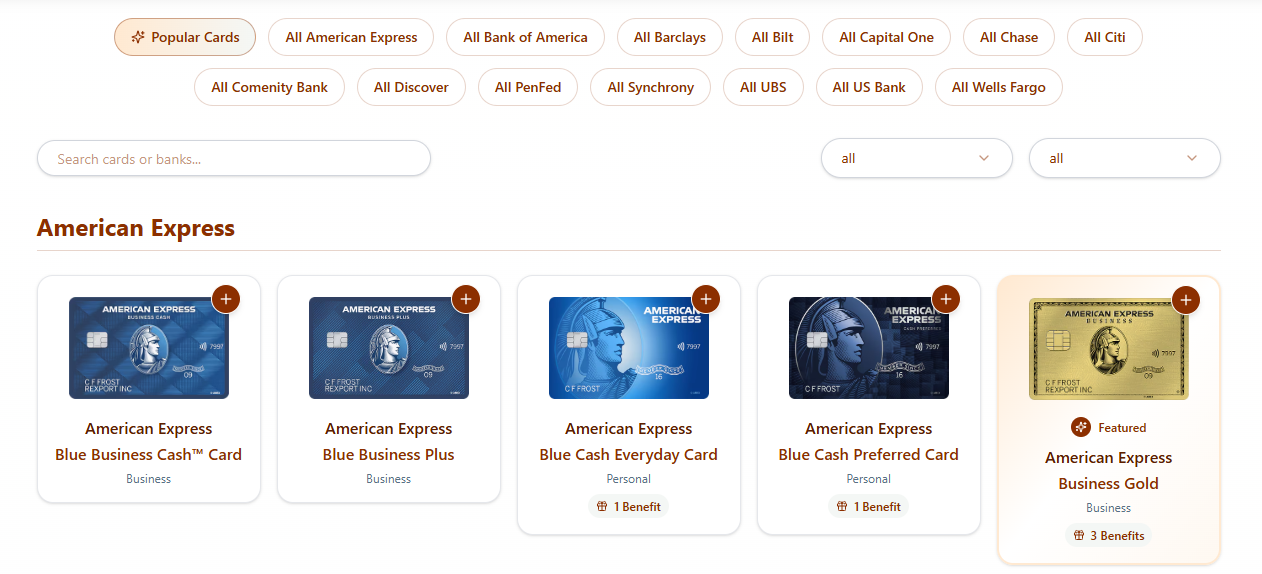
Once your cards are added, you can click into each and track your benefits. It’s easy to navigate, with options to view your cards in a list or grid format. A search function helps if you’re managing numerous cards.
Initial setup takes just a few minutes. The main tradeoff is manual management that requires ongoing effort, but you don ’t have to connect any financial accounts.
Tracking Statement Credits and Benefits
In the benefits dashboard, your benefits are organized so you can see what benefits you have available, what you’ve used, and how much you have left to redeem. You can see details such as the benefit value and when it resets. You can also see credits that are about to expire.
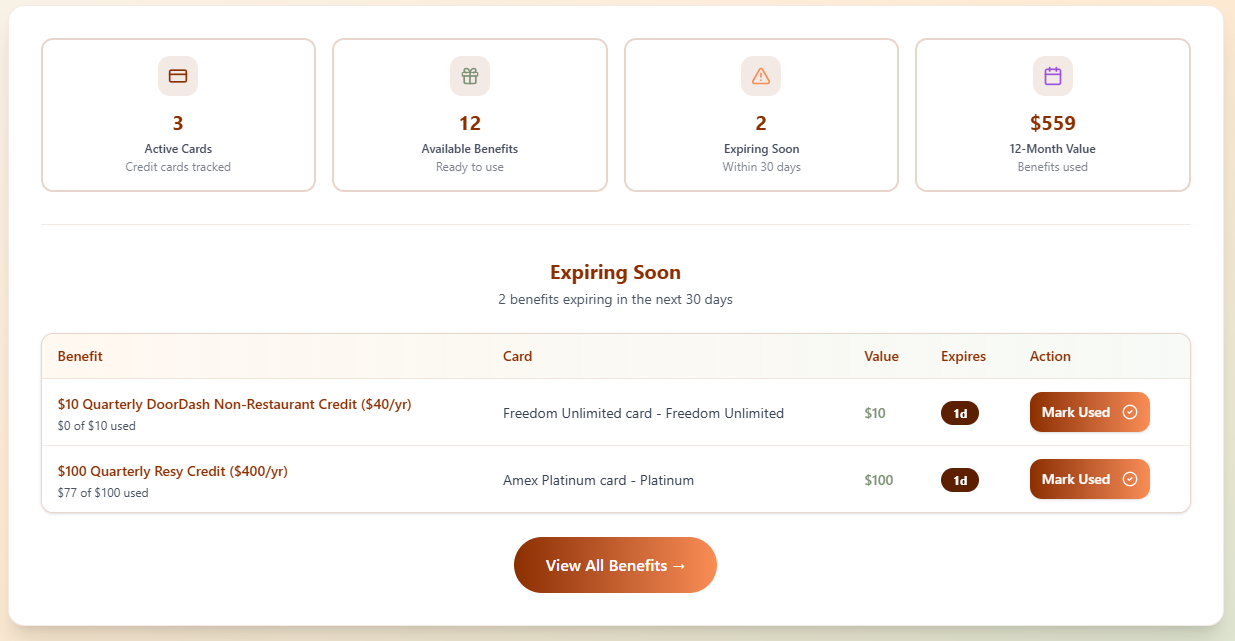
The tool supports various benefit types, including monthly, quarterly, and annual credits, as well as one-time perks. For example, you can track dining or travel credits alongside free night rewards.
A useful feature is the ability to mark benefits as used, entering the date and amount used. There’s an option to include partial usage, which is helpful for benefits that can be used over multiple transactions. For example, this feature is great for the up-to-$200 annual statement credit for airline incidental fees on the Platinum Card® from American Express, The Business Platinum Card® from American Express, and the Hilton Honors American Express Aspire Card (enrollment required).
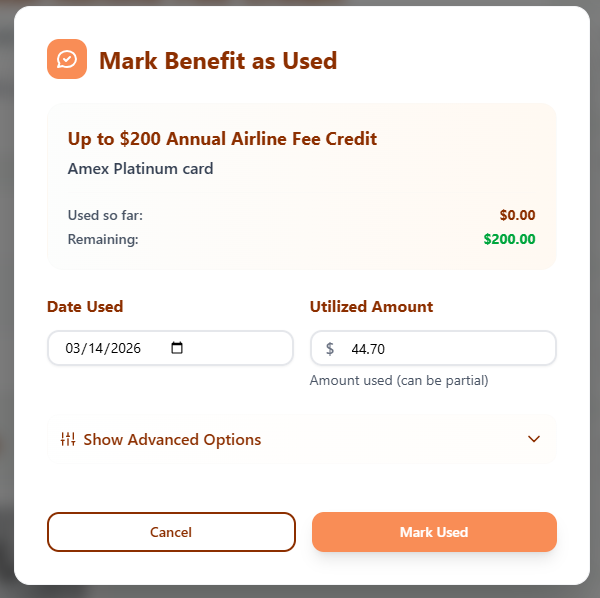
You can also add notes to track how you used a benefit or any other details you want to remember later. You can assign a perceived value to the credit to estimate how much it’s worth to you rather than the face value.
It also gives you a high-level view of how much value you’re getting from your cards, summarizing your benefits with a calculation of the available value and how much you’ve used. You can see totals for your benefits over various time frames, such as the year to date and the past 12 months. This helps you understand how much value you’re actually getting from your cards.
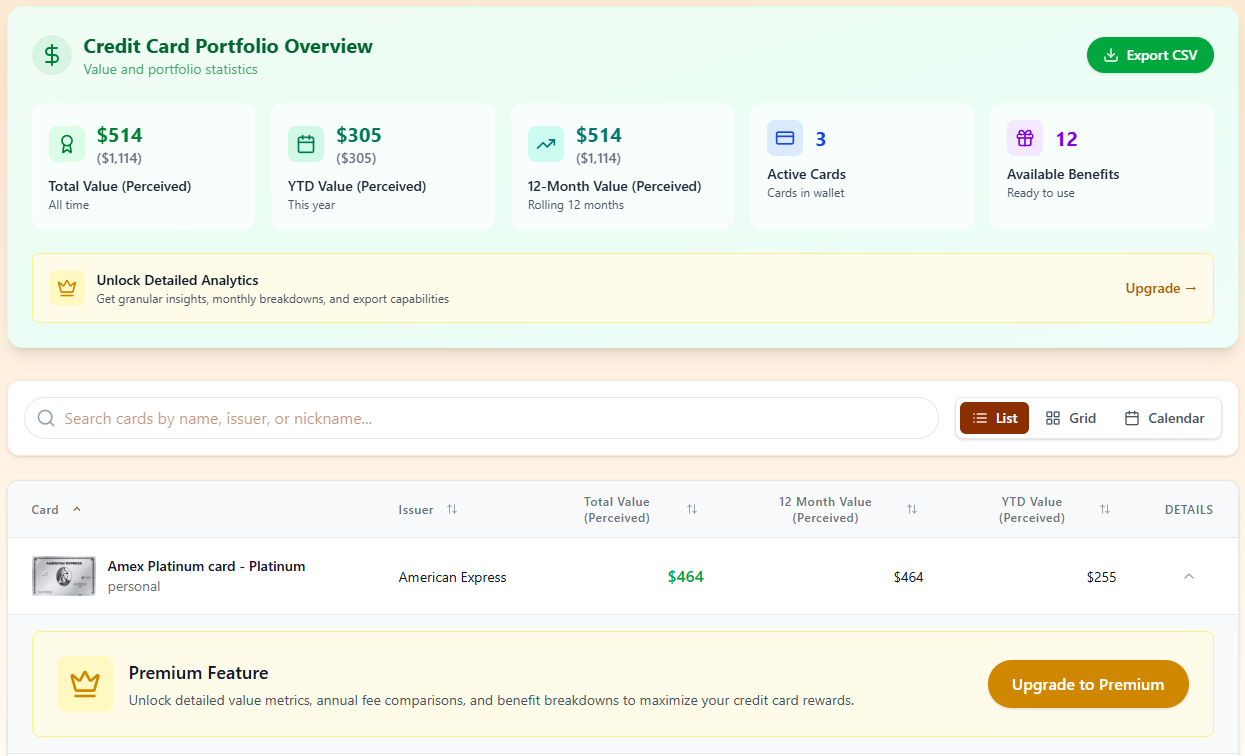
It’s also helpful to see the total value of your benefits compared to the value you’ve actually used. Plus, adding a perceived value helps determine what those benefits are realistically worth, not just their stated value.
Overall, this system is easy to use, especially for credits that reset throughout the year, and it helps avoid missing out on benefits. It can also help you evaluate whether a card’s annual fee is worth it, showing you how much value you’re getting from each card.
Maps Feature for Dining Credits
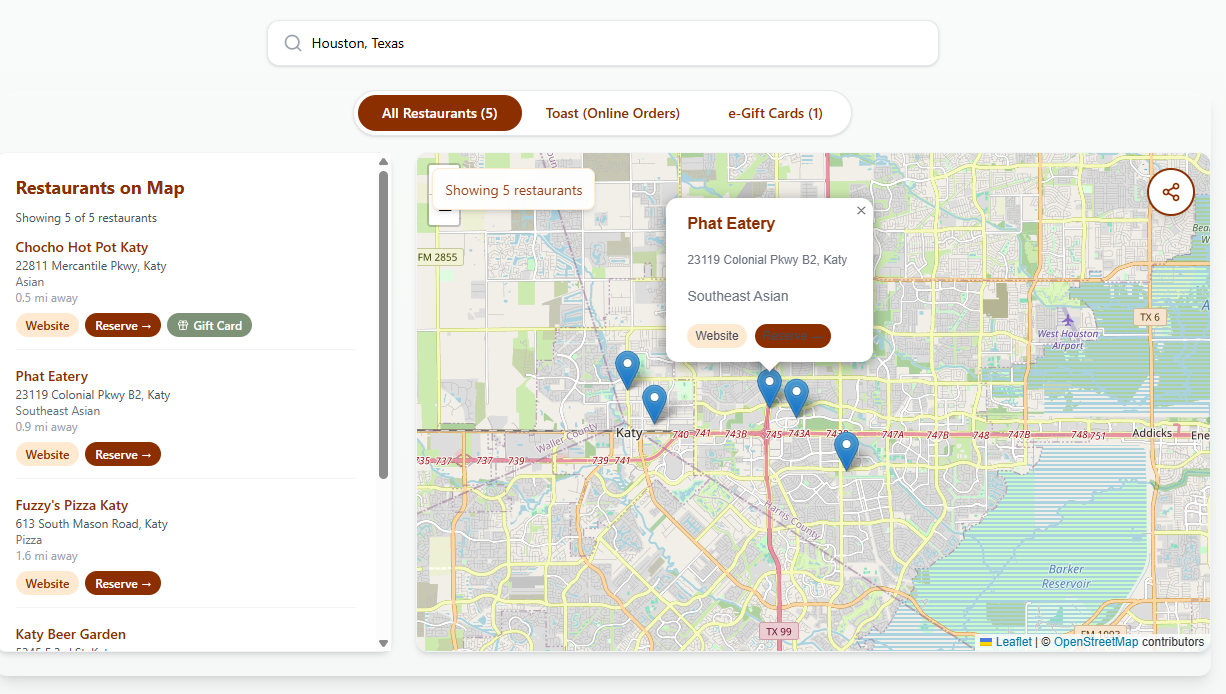
A practical feature of UseYourCredits is its interactive dining maps, which let you find places to redeem dining credits.
The tool has maps for Resy (used for the Amex Platinum card’s Resy credit, which requires enrollment) and the Chase Sapphire Reserve® dining credit with OpenTable. These maps let you search by location and find nearby restaurants, showing details such as whether you can purchase a gift card or order food online.
Notifications and Pro Features
UseYourCredits offers a Pro version, a paid subscription that enhances tracking. The primary features of Pro are adding notifications and removing the limit on the number of cards you can track.
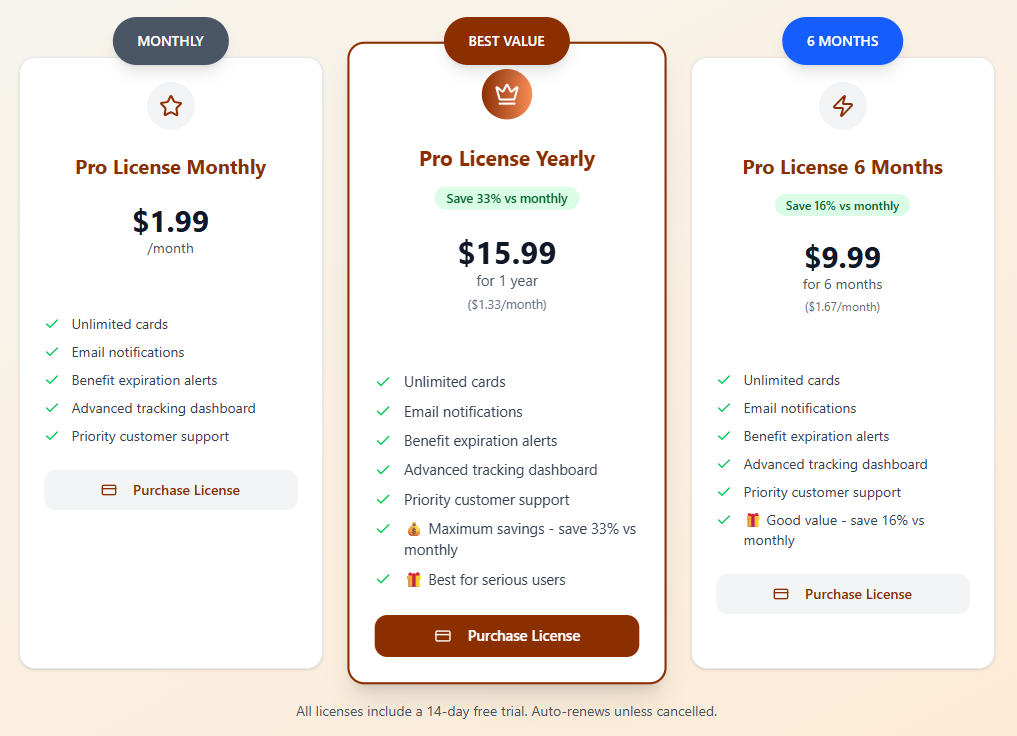
Members with a free account can only add up to 3 cards, which can be limiting if you have multiple cards with benefits to manage.
Another useful upgrade is adding email notifications and expiration alerts, which can help you stay on top of credits that are about to reset or expire and reduce your chances of missing out on their value.
The Pro account is relatively inexpensive at $1.99 per month or $15.99 annually, with a free 14-day trial available with either payment plan. At that price point, it’s easy to justify the cost if the tool helps you remember even a single credit you might have missed otherwise.
Limitations of UseYourCredits
Overall, UseYourCredits is helpful for organizing and tracking benefits, but there are nuances to consider.
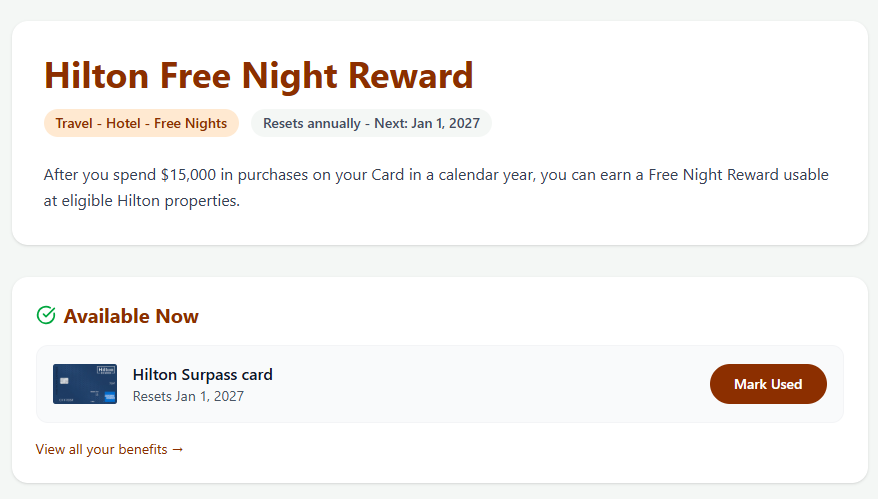
I encountered an issue tracking a Hilton free night certificate. UseYourCredits lists this benefit with an annual reset date on January 1, but that’s not how the benefit works. Free night certificates are valid for 1 year from the date they are issued, not on a calendar-year reset.
For example, a certificate I earned on December 16, 2025, is valid through December 16, 2026. The tool displayed a January 1 reset date that I could not change. It’s possible to add a clarifying note, but with an actual expiration date weeks earlier than the one set by UseYourCredits, the tool’s expiration alerts would likely come too late.
Another limitation is manual updates. This can be helpful because you don’t have to connect financial accounts and can add custom details to credits. You still have to remember to log your usage. If you forget to update the tool, your tracking may not reflect your actual usage.
The free version’s limit of 3 cards is restrictive for users with multiple rewards cards. If you want to stick with the free version, it could make sense to add the cards with the highest benefits value so you’re not leaving anything on the table. For example, I need the most help staying on top of benefits with my Amex Platinum card, Amex Business Platinum card, and Hilton Honors American Express Surpass® Card, so I could add those cards and rely on my memory, a spreadsheet, or other tools to manage benefits on other cards.
How UseYourCredits Compares to Other Tools
Compared to spreadsheets, UseYourCredits is easier to use and more structured. Rather than building a spreadsheet to track credits, dates, and usage, your information is organized in a visual dashboard.
The closest comparison is the MaxRewards tool, which tracks credit card rewards but also monitors credit card benefits and welcome offers. MaxRewards takes a more hands-off approach by connecting to your accounts and automatically tracking transactions, offers, and credits. However, benefits tracking on MaxRewards requires a paid Gold account or higher, which is $9 per month or $108 paid annually.
UseYourCredits is more narrowly focused and doesn’t try to track points balances or award bookings. Instead, it’s a lightweight and focused tool for managing statement credits and perks at a relatively low cost.
Who Should Use UseYourCredits
UseYourCredits is helpful for people with multiple credit cards that have ongoing benefits to manage. It’s especially useful if you have premium credit cards with monthly, quarterly, or annual credits, and it can help you stay organized if you’ve ever forgotten to use a credit before it expired.
This tool may be a good fit if you don’t want to link your financial accounts to third-party apps and prefer to maintain full control over information. On the other hand, it’s less useful if your cards have limited benefits or you prefer a fully automated system.
Bottom Line:
UseYourCredits is simple, affordable, and effective, but only if you keep it updated.
Final Thoughts
UseYourCredits is a simple but effective tool for tracking credit card benefits, allowing you to organize your credits, monitor usage, and see the value you get from your cards over time.
The manual approach isn’t appealing to everyone, but it offers more privacy and the ability to track partial usage and assign your perceived value to benefits. Maps and reminders make it easier to use your credits rather than track them.
However, it’s not a perfect tool, as some benefits don’t align cleanly with real-world expiration timelines, and the free version limits tracking to 3 cards. If you manage multiple cards with ongoing benefits and need help keeping track of them all, UseYourCredits can be useful and potentially worth paying for a Pro subscription.